


Leep: Chat Video, Share
4.239.00 Reviews
App Specs
- Version
- 1.7.7
- Updated On
- License
- Free
- Downloads
- 100,000+
- Developer
- Donut Chat Inc Limited
- Categories
- Lifestyle
- Platform
- Android
Screenshots



 Analysis by AppCompare
I tend to judge social apps by what happens when a conversation moves between formats: a quick message becomes a call, then someone shares a photo or a thought for the group. Leep: Chat Video, Share is built around that mix, bringing messaging, video and social posts into one place. That can make everyday connection feel less scattered, though it also means the experience depends on a reliable internet connection and on having people you know there.
When a connection has to carry the conversation
Chat, video calls and shared posts all rely on connectivity in different ways. A text exchange can remain useful when a connection is uneven, while a video call is much less forgiving: weak Wi-Fi or mobile coverage can interrupt the flow, soften the picture or make people talk over one another. My practical advice is to start a call from a stable connection when the conversation matters, rather than assuming the app can compensate for a poor signal.
That distinction matters if you use one app for several kinds of contact. Leep can make it convenient to move from messaging a friend to seeing them on a call, but the convenience does not remove the network demands of video. If the call begins to stutter, switching to text is a sensible fallback; it keeps the conversation going without asking a shaky connection to carry live audio and video.
A useful fit for small, familiar circles
I can see this working best for people who want a shared place for casual conversation, group plans and posts among friends. A group chat is handy for coordinating a dinner or sharing photos afterward, while a call can bring in the people who would rather talk than type. The social feed adds another way to keep up between direct conversations, so the app is not limited to one-to-one messaging.
For example, imagine friends trying to settle on a weekend plan while everyone is out of the house. One person can message the group, another can post an image for everyone to react to, and the group can switch to a call when typing becomes cumbersome. The useful choice is not to force every exchange into video: use text for details, a post for something the group should see, and a call when tone or quick back-and-forth matters.
What to consider before making it your main app
An all-in-one layout is helpful only if the people you want to reach are willing to use it too. Most people already have familiar messaging and social apps, and asking a whole group to move can create friction. I would try Leep with a small circle first, rather than treating it as an immediate replacement for every existing conversation. If your friends are already settled elsewhere, a dedicated messenger or the social network they regularly check may be the easier choice.
There is also a trade-off in combining private and public-facing activity. Direct chats and posts serve different purposes, so I would pause before sharing something personal to make sure it belongs in the intended space and audience. The app’s privacy controls are useful to explore, but they are not a substitute for checking who can see a particular post or being thoughtful about what you share.
Worth Reading Before You Choose

Flipboard Shows What News Apps Must Do Beyond the Feed

Switching to Android Auto Means Rethinking Your Driving Routine

Google Calendar Makes a Crowded Week Easier to Manage

Ludo King Makes the Most of the Minutes Between Plans

Baby Panda World Brings Quick Play to Modern Phones, but Its Game Library Feels Busy

ESPN’s Live Game View Makes Following Close Games Easier
Everyday use on the move
Leep’s mix of communication tools suits brief moments during the day: checking a group chat between errands, replying to a friend, or catching up with posts when you have a few minutes. Video is better saved for a place where you can hear clearly and hold the phone comfortably. In a noisy shop or while walking through a busy street, a short message is usually more practical than trying to maintain a call.
To keep a group exchange manageable, I would use a clear chat for a particular plan and put broadly interesting photos or updates in the sharing area instead of sending every item directly to everyone. That small habit makes it easier to find useful details later and reduces the chance that a busy group chat becomes a stream of unrelated material. It is a simple workflow choice, not a special feature, but it can make a combined app feel less cluttered.
Leep is a free lifestyle app from Donut Chat Inc Limited. It is rated Teen, and its current version is 1.7.6, with Android support beginning at version 7.0. The app has an average rating of 4.3 from around 829 ratings, and it has passed 100,000 installs. Those figures suggest an established audience, but I would still decide based on whether its mix of chat, calls and sharing fits the people I actually want to reach.
First Impressions
Right off the bat, Leep: Chat Video, Share impressed me with its sleek interface. The app's design is modern and intuitive, making it super easy to navigate. You know that feeling when you pick up a new gadget and everything just feels right? Yeah, that's what happened here.
The home screen greets you with a clean layout, with tabs for chats, video calls, and sharing options. It's like the developers knew what I wanted before I did. The color scheme is easy on the eyes, using a mix of blues and whites that give off a chill vibe.
Chatting Made Easy
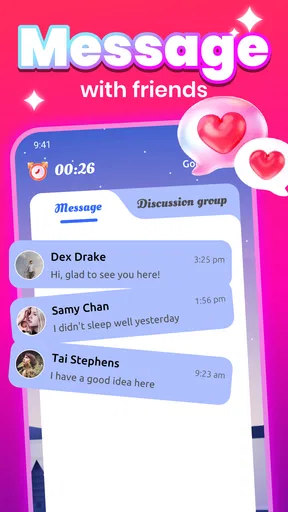
Let's talk about the chat feature because, honestly, it's where I spent most of my time. The messaging interface is straightforward, allowing for text, emojis, and fun stickers. You can create group chats, and the app even supports multimedia, so sharing photos and videos is a breeze.
One cool thing I noticed is the "disappearing message" feature. It's a bit like having a secret chat; you can set messages to vanish after a certain period. Perfect for when you're sharing those inside jokes and memes!
Crystal Clear Video Calls
Moving on to video calls, which are pretty much a staple in my life now. The video quality on Leep is surprisingly good, even with my less-than-stellar Wi-Fi connection. I had a couple of video calls with friends, and the connection held up well, with minimal lag and clear audio.
Setting up a video call is as easy as pie. Just tap on a contact, and you're connected in seconds. Plus, there's an option to add more people to the call, making it ideal for group hangouts.
Share and Connect
Now, on to the sharing feature. This part of the app is all about community and connectivity. You can post updates, photos, and videos, much like a social media feed. I loved how easy it was to interact with friends' posts—leaving comments and likes is just a tap away.
The app also has a nifty discovery feature, letting you explore content shared by others. It's a great way to find new people and see what they're up to. I found myself scrolling through the feed, discovering new trends and ideas from users around the globe.
Privacy and Security
In today's digital world, privacy is a big deal, right? So, I dug into the privacy settings, and I was pleased to find that Leep takes security seriously. You can customize who sees your posts and even lock certain chats with a password. It's reassuring to know that my data is protected.
For a more considerate first week, I would treat the discovery feed as something to browse deliberately rather than a reason to share publicly straight away. Explore the kind of posts that appear, then decide what you want your own profile and audience to look like. The ability to adjust who sees posts is useful, but it is worth checking those choices before sharing a family photo or an update meant only for close friends.
Disappearing messages have a similarly specific role. I would use them for casual, temporary conversation, not as a promise that sensitive information can never be retained or seen. A disappearing setting changes how a message is presented in the chat; it should not change the basic rule that anything sent digitally deserves care. For important plans, keeping the key details in an ordinary message may also be more practical than relying on a message designed to vanish.
When the network falters
Any social app that combines live calls with media sharing has to contend with uneven mobile service. If a photo or post takes longer than expected to appear, I would avoid repeatedly tapping the share control; first check whether the connection has returned and whether the item has already gone through. Duplicate attempts can confuse a group, especially when people are coordinating something time-sensitive.
For calls, a simple recovery routine is often the least frustrating: pause, move to a stronger Wi-Fi or cellular spot if one is available, and try again only once the connection is steadier. If that is not practical, fall back to text and make the next step clear. This is particularly useful when arranging a pickup or meeting, where a concise written confirmation is more dependable than staying on a call that keeps breaking up.
Leep is not the right choice for someone who needs every communication tool to work reliably in places with poor coverage, or who expects a social feed to remain useful without an internet connection. I would also choose a simpler messaging option if I only needed dependable text exchanges and had no interest in video or discovery. The advantage here is breadth, but breadth is less valuable when the network or the group’s habits make those extra parts hard to use.
Keeping mobile use sensible
Video and media can consume more mobile data than ordinary text, so I would save longer calls for Wi-Fi when that is convenient and avoid treating the app’s feed as something to scroll endlessly while away from home. That is a general data-conscious habit rather than a claim about a special setting in Leep. If your mobile plan is limited, checking your device’s data-use controls can help you decide how often to call or browse on cellular service.
It is also worth considering battery and attention, not just data. A video conversation asks you to keep the screen active and stay present, while quick messages can fit around other tasks. I find the best use of a combined app is selective: open it with a purpose, choose the format that suits the moment, and leave the feed for a time when you actually want to browse rather than checking it reflexively.
Wrapping Up My Experience
All in all, Leep: Chat Video, Share is a solid app that combines essential social features in one place. Whether you're looking to chat, video call, or share moments with friends, this app has got you covered. It's user-friendly, visually appealing, and offers a seamless experience.
So, if you're on the hunt for an all-in-one social app, give Leep a shot. It's like having a little piece of the social world right at your fingertips, and who wouldn't want that?
Ready to dive into the world of Leep? You can download it for both Android and iOS and see for yourself why it’s creating quite a buzz. Happy chatting!
My connectivity verdict
I see Leep as a better fit for a close group that genuinely wants chat, calls and sharing together than for someone hunting for a replacement for every social account they already use. Its appeal is the ability to move between those kinds of contact without juggling separate apps; its limitation is that each move still depends on connectivity, and video is the most demanding part of the mix. Try it with a few friends, establish sensible sharing habits, and see whether the group naturally uses more than one feature. If it does, the all-in-one approach can earn its place on your phone. If not, a familiar messenger may be the more practical everyday choice.
Pros
- Intuitive user interface for easy navigation.
- High-quality video calls with minimal lag.
- Privacy-focused with encrypted messaging.
- Seamless media sharing capabilities.
- Cross-platform support for Android and iOS.
Cons
- Occasional connectivity issues in low-signal areas.
- Limited customization options for chat themes.
- Notifications can be delayed at times.
- Consumes significant battery during video calls.
- Some features require in-app purchases.
FAQs for Leep: Chat Video, Share
What is Leep: Chat Video, Share used for?
Leep is a versatile app designed for seamless communication and sharing. It allows users to chat with friends, engage in video calls, and share various types of media effortlessly. Its user-friendly interface and diverse features cater to those looking for an all-in-one communication platform.
Is Leep available on both Android and iOS?
Yes, Leep is available for both Android and iOS platforms. Users can download the app from the Google Play Store or the Apple App Store, ensuring compatibility with a wide range of devices for optimal user experience across different operating systems.
Does Leep support group video calls?
Absolutely, Leep supports group video calls, allowing multiple users to connect simultaneously. This feature is perfect for virtual hangouts with friends or collaborative meetings, providing high-quality video and audio to enhance the group interaction experience.
Is my data secure on Leep?
Leep prioritizes user privacy and data security by implementing robust encryption protocols. All chats and media shared on the platform are protected to ensure that user information remains confidential and secure from unauthorized access.
Are there any in-app purchases in Leep?
Leep offers a range of free features, but it also includes optional in-app purchases. These purchases can enhance user experience by providing additional features or ad-free usage, catering to users who wish to customize their app experience further.


